Warn or Drop Incomplete
You can send emails to applicants that have incomplete applications over 25 days old. You can also drop applications of those who have been warned and have still not completed their applications.
Here's how:
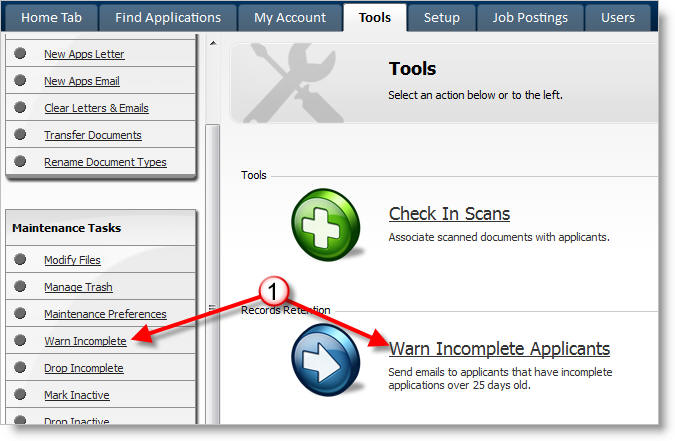
1) If you wish to notify regarding incomplete applications, click on Warn Incomplete which is located under the Tools tab.
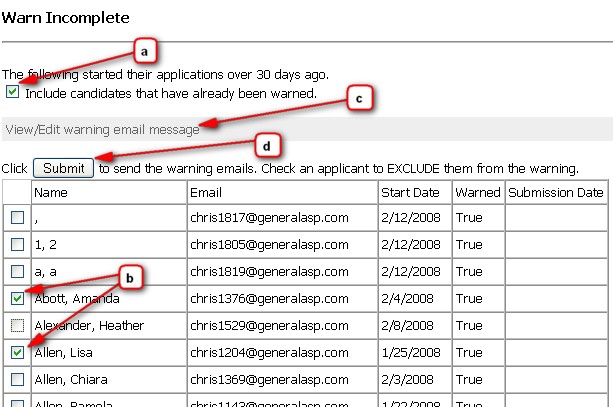
a) Click if you want to email those who have already been warned, but not yet deleted.
b) Click on the checkmark to deselect any applicant you do not wish to notify.
c) Click the "View/Edit warning email message" section to review the contents of the warning message.
d) Click on Submit to send the warning e-mails.
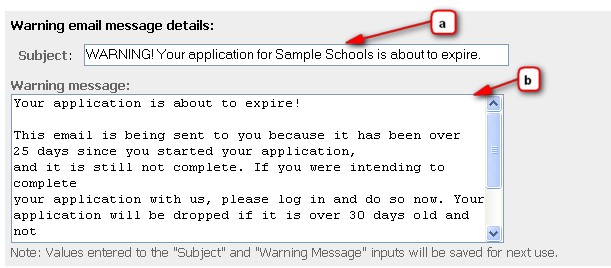
Note: If you wish to modify either the subject or the body of the warning message, click the "View/Edit warning email message" section and you will be able to update the (a) subject, and (b) message. Any values entered to these fields will define the outgoing warning message and be saved for the next use of the "Warn Incomplete" tool.
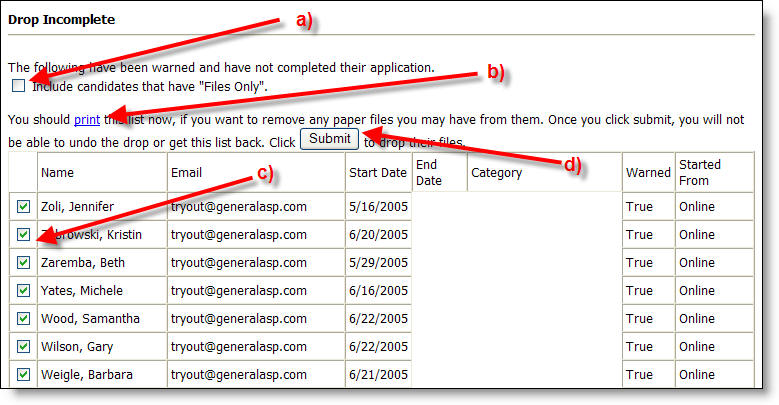
2) If you wish to drop incomplete applications, click on Drop Incomplete from the Tools tab.
a) Click in the box to include candidates that have "Files Only".
b) Click on print to have a list of dropped applications so that you can remove any paper files later.
c) Click on the check box next to the name of any candidate you may not want to delete.
d) Be sure you have selected the correct application, and that you have printed the list before clicking Submit to drop the files. You will not be able to undo the drop or get the list back.