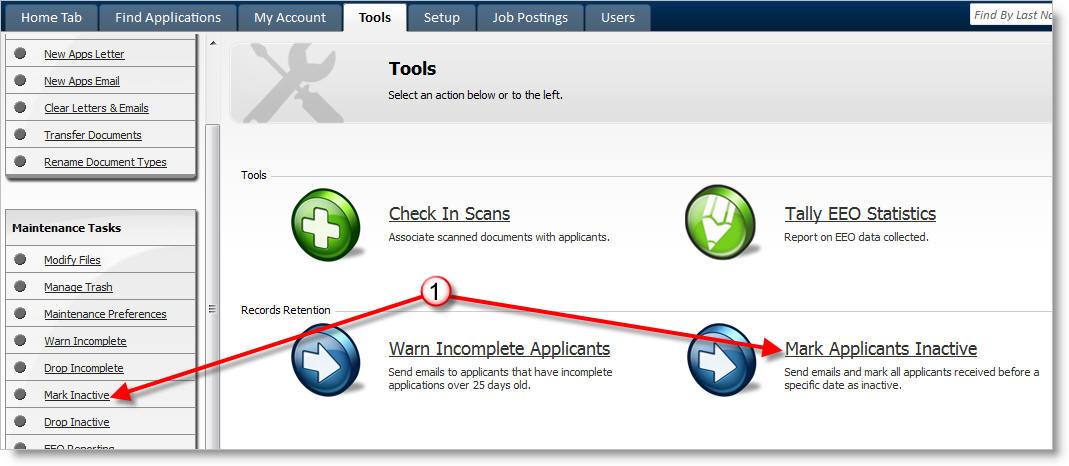
Mark Inactive
You can mark applicants inactive by going to Tools -> Mark Inactive. Applicants whose files are out of date and will be marked inactive and will receive an email message indicating that their application was marked inactive.
Here's how:
From the Tools tab click on Mark Applicants Inactive.
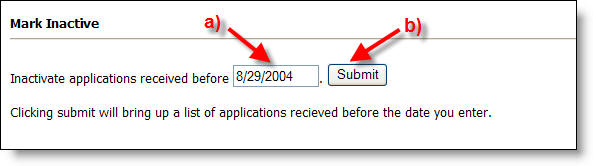
a) Enter the date before which you wish to inactivate applications.
Note: Use a date no less than one month from today so as to not mark
someone who applied yesterday inactive.
b) Modify the onscreen message and then click Submit to view the list of applications to be placed inactive.
c) Click "Start De-Activation" to inactivate the applicants in the list. Inactive applicants are sent an email with the message you specified.
After the inactivation runs, the following changes occur to your system:
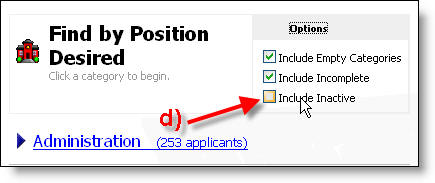
d) Inactive applicants are not presented in totals on the Find Applications -> By [something] screens unless the "Include Inactive" option is checked.
Note: you can always find applicants by last name, even if they are inactive.
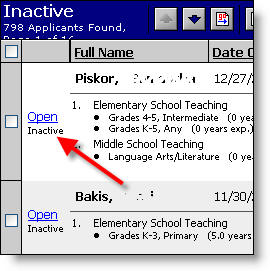
e) Once an applicant is marked inactive, they will by flagged with the word "inactive" under their "open" link.
Drop Inactive
After a certain amount of time, you may choose to delete (drop) the applicants
who never reactivated their application.
Note: Do not run this back-to-back with the Mark Inactive
process!!! After running the Mark Inactive process, let at
least 1 month go by before running the Drop Inactive
process.
For example, if 1000 applicants were
warned on 1/1/2005 and then 800 remain inactive on 1/1/2006, you may want to
drop the 800 applicants because it has been a full year (at least) since they
logged into their application or applied for a vacancy.
You can drop these applicants by clicking on Drop Inactive and then entering 1/1/2005, indicating that you want to drop all applicants who are inactive and who have not logged into their application for a full year.